Save Time When Updating a Repository with Files from a Remote Server
Copy files directly between remote servers with scp and commit them from the destination, without downloading them to your machine first.
Updated:
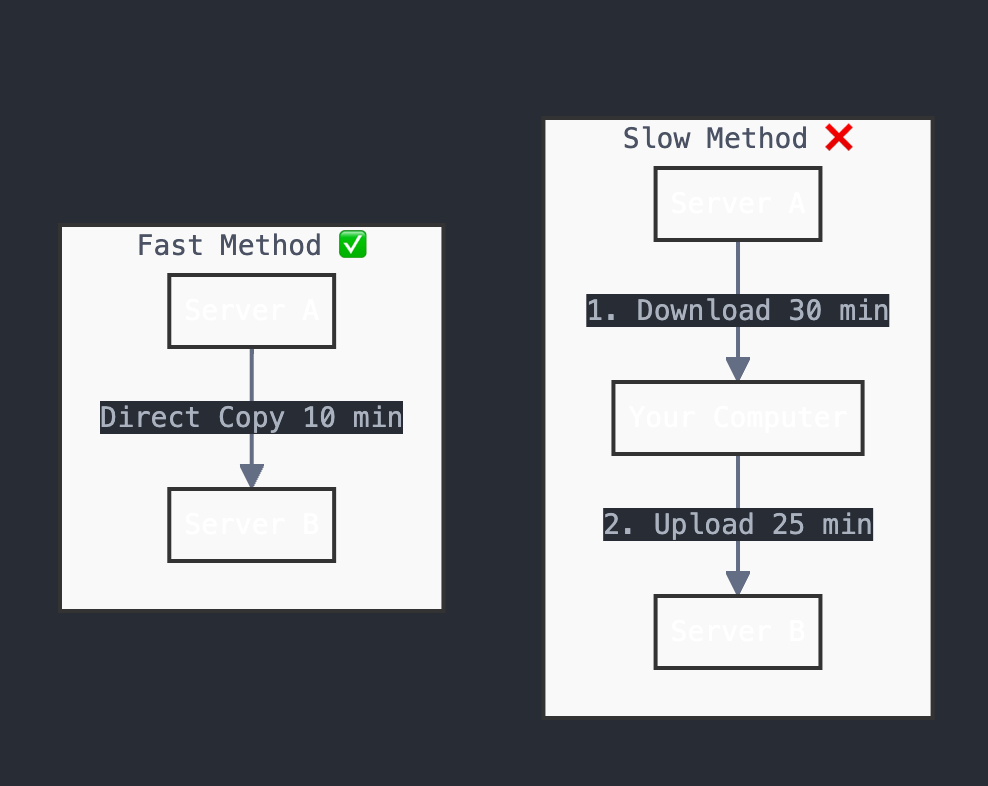
When my internet connection is slow, downloading files from a remote server before uploading them again takes a while. Here’s how I use scp to copy them directly.
The Problem
I often need to copy large files or folders from one server and commit them to a repository on another. Over a slow connection, the usual process takes a long time:
- Download from Server A to my computer
- Upload from my computer to Server B
- Update repository
I can skip the trip through my computer.
The Solution: Direct Server-to-Server Transfer
Instead of downloading files to my computer first, we can copy files directly between servers. This is much faster because servers usually have better internet connection than our local computer.
Here are the steps I use. I connect to the destination server, change into the repository, and pull the source directory over SSH.
# First, connect to your main server
ssh user@destination-server
# Use SCP to copy files from other server
scp -r user@another-server:/var/www/ghost/content/images .
# After files are copied, update repository
git add -- images/
git commit -m "Updated images"
git pushUnderstanding the SCP Command
Let me explain the SCP command:
scp: The command for secure copy-r: Copies the directory and its contents recursivelyuser@another-server: The SSH user and hostname of the source server:/var/www/ghost/content/images: The source directory.: Copies into the current directory
Benefits of This Method
- Skip the download to your computer
- Use faster server-to-server connection
- Keep working while the transfer runs in a terminal session
- Less internet usage on your computer
Tips from My Experience
- Always check disk space on target server before copy
- Use
screenortmuxfor long transfers - Test with small folder first
- Keep backup of important files
Conclusion
This saved me time when moving a directory between two servers. I still check that the files belong in Git before committing them.